MASINDE MULIRO UNIVERSITY OF SCIENCE & TECHNOLOGY
ECE 422- DATA COMMUNICATIONS & COMPUTER NETWORKS
INTRODUCTION TO INTERNET PROTOCOL (IP) ADDRESSING
Every protocol suite defines some type of addressing that identifies
computers and networks. IP addresses are no.exception to this rule. There
are certain values that an IP address can take; these have been defined by
the IEEE committee.
A simple IP address is a lot more than just a number. It tells us the
network of which the workstation is part and the node ID.
When the IANA committee sat down for the first time to sort out the range of
numbers that were going to be used by all computers, they came up with five
different ranges or, as we call them, "classes" of IP addresses.
When an entity applied for IP addresses they were given a certain range
within a specific class depending on the size of their network. The classes
were:
Class A:
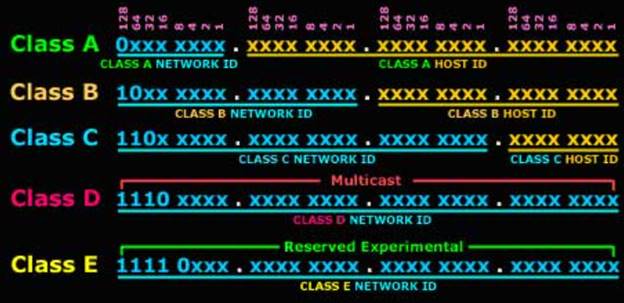
The first bit of the first byte is zero, i.e a router only checks the first
bit to determine the class,( i.e 1st byte = 0xxxxxxx)
Class B:
First Bit of the first byte is turned on but the second is turned off , (i.e
1st byte = 10xxxxxx)
Class C:
The First two bits of the first byte are always turned on but the third is
never on, (i.e i.e 1st byte = 110xxxxx)
Class D:
The First three bits of the first
byte are always turned on but the fourth is never on, (i.e i.e 1st
byte = 1110xxxx)
Class E:
The First four bits of the first byte are always turned on (i.e i.e 1st
byte = 1111xxxxx)
The first three classes (A, B and C) were used to identify workstations,
routers, switches and other devices, whereas the last two classes (D and E)
were reserved for special use.
An IP address consists of 32
Bits, which means it's four Bytes long. The first octet (first eight bits or
first byte) of an IP address is enough for us to determine the class to
which it belongs. And, depending on the class to which the IP address
belongs, we can determine which portion of the IP address is the network ID
and which is the node ID.
|
LEADING BITS
(DECIMAL-RANGE) |
NO.
OF NETWORKS |
ADDRESSES PER
NETWORK |
START ADDRESS |
END ADDRESS |
|
|
CLASS A |
0
(0 – 127) |
128 (27) |
16,777,216(224) |
0.0.0.0 |
127.255.255.255 |
|
CLASS B |
10
(128 – 191) |
16,384(214) |
65,536(216) |
128.0.0.0 |
191.255.255.255 |
|
CLASS C |
110 (192 – 223) |
2,097,152 (221) |
256(28) |
192.0.0.0 |
223.255.255.255 |
|
CLASS D |
1110
(224 – 239) |
Not defined |
Not defined |
224.0.0.0 |
239.255.255.255 |
|
CLASS E |
1111 (240 – 255) |
Not defined |
Not Defined |
240.0.0.0 |
255.255.255.255 |
For example, if I told you
that the first octet of an IP address is "168," then, using the above table,
you would notice that it falls within the 128-191 range, which makes it a
class B IP address.
1.2 UNDERSTANDING THE CLASSFUL IP
ADDRESS SYSTEM
Under the classful system,
companies were assigned different IP ranges within these classes, depending
on the size of their network. For instance, if a company required 1000 IP
addresses, it would probably be assigned a range that falls within a class B
network which has a capacity of
65,536 addresses per
network rather than a class A (capacity
16,777,216 ) or C
(capacity 256). Class A IP addresses were designed for large networks, class
B for medium size networks and class C for smaller networks.
(a)
It tells us which network the device is part of (network ID).
(b)
It identifies that unique device within the network (node ID).
Think of the network ID as the
town you live in and the node ID as your street in that suburb. You can tell
exactly where someone is if you have their town and street name. In the same
way, the network ID tells us to which network a particular computer belongs
and the node ID identifies that computer from all the rest that reside in
the same network.
Figure 1 gives you a
small example to help you understand the concept.
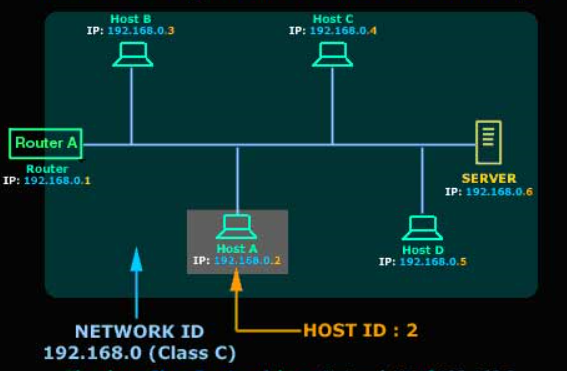
In figure 1, you can see a small network. We have assigned a class C IP
range for this network. Remember that class C IP addresses are for small
networks.
1.2.1
CLASS A NETWORK
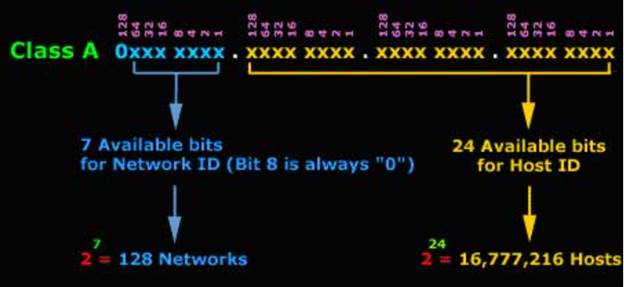
It has a total of 7 bits for the Network ID (the
1st bit is always set to 0) and 24 bits for the Host ID. Now all
we need to do is calculate how much seven bits is.
 =
128 networks. For the hosts,
=
128 networks. For the hosts,
 =
16,777,216 hosts in each network, of which two cannot be used because one is
the Network Address and the other is the network broadcast address (see the
table towards the end of this page).
=
16,777,216 hosts in each network, of which two cannot be used because one is
the Network Address and the other is the network broadcast address (see the
table towards the end of this page).
Figure 1.2 shows the composition of the various fields in Class A address system.
1.2.2 CLASS B NETWORK
Class B networks have 14 bits
for the network ID (Bits 15, 16 are set and can't be changed) and 16 bits
for the host ID, that means you can have up to 214
= 16,384 networks and 216=
65,536 hosts in each network, of which two cannot be used because one is the
network address and the other is the network broadcast address. So if I
asked you how many "valid" hosts can you have on class B network, you should
answer 65,534 and not 65,536.
1.2.3 CLASS C NETWORKS
Class C networks have 21 bits for the network ID (Bits 22, 23, 24 are set
and can't be changed) and eight bits for the host ID, that means you can
have up
 =
2,097,152 Networks and
=
2,097,152 Networks and
 =
256 hosts in each network, of which two cannot be used because one is the
network address and the other is the network broadcast address. So if I
asked you how many "valid" hosts you can have on class C network, you should
answer 254 and not 256.
=
256 hosts in each network, of which two cannot be used because one is the
network address and the other is the network broadcast address. So if I
asked you how many "valid" hosts you can have on class C network, you should
answer 254 and not 256.
1.2.4 RESERVED IP ADDRESSES
Some IP addresses that have been reserved for special use. This doesn't mean
you can't assign them to a workstation but in the case that you did, it
would create serious problems within your network. For this reason it's best
to avoid using these IP addresses.
|
IP ADDRESS |
FUNCTION |
|
Network 0.0.0.0 |
Refers to the default route. This route is to simplify routing
tables used by IP. |
|
Network 127.0.0.0 |
Reserved for Loopback. The Address 127.0.0.1 is often used to
refer to the local host. Using this Address, applications can
address a local host as if it were a remote host. |
|
IP Address with all host bits set to "0" (Network Address) e.g.
192.168.0.0 |
Refers to the actual network itself. For example, network
192.168.0.0 can be used to identify network 192.168. This type
of notation is often used within routing tables. |
|
IP Address with all node bits set to "1" (Subnet / Network
Broadcast) e.g. 192.168.255.255 |
IP Addresses with all node bits set to "1" are local network
broadcast addresses and must NOT be used.
Some examples: 125.255.255.255 (Class A), 190.30.255.255 (Class
B), 203.31.218.255 (Class C). See "Multicasts"
& "Broadcasts"
for more info |
|
IP Address with all bits set to "1" (Network Broadcast) e.g.
255.255.255.255 |
The IP Address with all bits set to "1" is a broadcast address
and must NOTbe used. These are destined for all nodes on a
network, no matter what IP address they might have. |
2.0 IP ADDRESSES
3.1 BACKGROUNG
Early network design, when global end-to-end connectivity was envisioned for
communications with all Internet hosts, intended that IP addresses be
uniquely assigned to a particular computer or device. However, it was found
that this was not always necessary as private networks developed and public
address space needed to be conserved.
Computers not connected to the Internet, such as factory machines that
communicate only with each other via TCP/IP, need not have globally unique
IP addresses.
2. PUBLIC AND PRIVATES ADDRESSING
IP addresses can be either public or private. “Public” means an IP address
can be reached from the Internet, while “private” means it can’t. For
example, in a typical home network, a router has a public IP address on the
Internet. The computers, smartphones, game consoles, and other devices
behind the router all have unique private IP addresses on the home network.
The router acts as an intermediary, forwarding traffic to the local IP
addresses that request it. From an outside perspective, all devices on the
home network are communicating with the Internet from a single public IP
address.
Assuming you’re behind a router performing network address translation, you
have two IP addresses that matter. Your computer’s IP address is likely a
private IP address, probably starting with 192.168 — is a range of IP
addresses specially allocated to private networks. You also likely have a
public IP address, which is used when communicating with other computers
over the Internet.
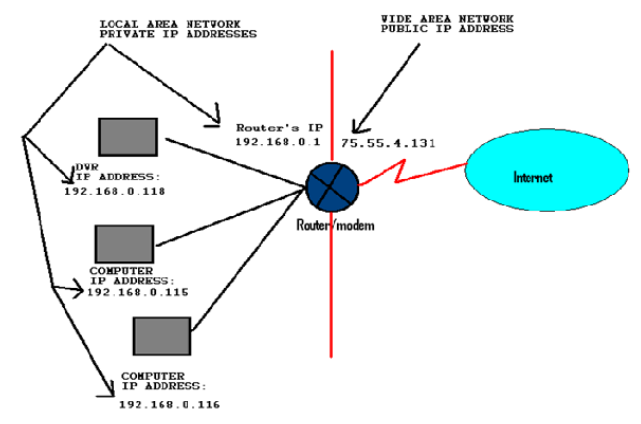
For example, if you’re hosting a server on your computer, people on the
Internet will need the public IP address from your router to connect to your
server. People behind your router — on the same local network as your
computer — will need the local IP address from your computer to connect.
If your computer is connected directly to the Internet with no router
sitting in between, your computer’s IP address is a public IP address.
Table 2.1
Comparison between Public IP and Private IP address:
|
Public IP Address |
Private IP Address |
|
|
Definition |
Used for identification of a home/corporate network to the outside
world |
Used for identification of a network device inside the home network |
|
Uniqueness |
It is unique throughout the entire network |
Two or more separate networks can have same private IP addresses
assigned to different computers |
|
Example |
202.60.23.1 |
192.168.0.3 |
|
Usage |
Used on the Internet or other WAN |
Used on a Local Area Network; for computers not directly connected
to the Internet |
Manufacturers of routers and other networking equipment assign private IP
addresses for their resources. They have a commitment to introducing the
best in class networking equipment with the most suitable IP addresses. The
most special blocks among a list of reserved blocks in our time are as
follows.
Router manufacturers make use of the block 192.168.x.x worldwide these days.
Every user of any brand of a router has to use its private IP address
otherwise known as a default IP address for accessing the configuration
panel. You can make use of the private Internet Protocol address 192.168.1.1
to access Linksys router’s configuration panel directly.
Once you have decided to configure your router by using the private IP addresses, you have to identify the default IP address of your router at first. You can type in ipconfig in the command prompt and take note of your router’s IP address.
2.3 IANA-RESERVED PRIVATE IPV4 NETWORK RANGES
Three
non-overlapping ranges of IPv4 addresses for private networks were reserved
in RFC 1918. These addresses are not routed on the Internet and thus their
use need not be coordinated with an IP address registry. Today, when needed,
such private networks typically connect to the Internet through network
address translation (NAT).
|
Start |
End |
No. of addresses |
|
|
24-bit block (/8 prefix, 1 × A) |
10.0.0.0 |
10.255.255.255 |
16777216 |
|
20-bit block (/12 prefix, 16 × B) |
172.16.0.0 |
172.31.255.255 |
1048576 |
|
16-bit block (/16 prefix, 256 × C) |
192.168.0.0 |
192.168.255.255 |
65536 |
Any user may use any of the reserved blocks. Typically, a network
administrator will divide a block into
subnets;
for example, many
home routers
automatically use a default address range of 192.168.0.0 through
192.168.0.255.